Your team can see the activity. The window to use it is shrinking.
Every drop, launch and announcement creates a spike. You can see something happened. The harder question is what it means, and whether you can act while it still matters.
Community is where that answer lives. Not another channel to manage, but a system that keeps the relationship alive between launches and tells you what to do next.
Attention alone With community
Community holds the floor between launchesIllustrative
Built on real operations
We built this to run other people's communities. Now it's a product.
Every module started as something our team needed while running a launch. Three of
those launches, and what they did.
Electronic Arts
The Sims: growing the community while deepening audience understanding
We audited The Sims Discord for engagement, lapsed-player behaviour and content preference, then rebuilt the strategy around winning lapsed players back. Our research team tracked 50K+ players beyond Discord, connecting community behaviour to gameplay, retention and winback.
Community growth, 10 months110%
Players tracked50K
Undisclosed AAA publisher
Turning Discord into a player data and engagement engine
Ahead of a major title drop we built a multi-IP server from scratch. It hit 120K members in the first 12 hours and is still core to their audience strategy. A follow-up campaign paid players in-game currency to link their game account, giving the developer behavioural data across both.
First day joins120K
Avg daily joins2.6x
Growth, post campaign116%
Interscope Records
Imagine Dragons' Loom album launch
We built a Discord integration that sold limited edition vinyl to verified community members at the real price, while the public store listed it at $5,001,000. It turned casual listeners into a fanbase, earned press coverage, and sold out in nineteen minutes.
Earned impressions500K
Community growth17%
Sell out window19 min
Software / New
The Fan Dynamics app and dashboard
The tooling we built for our own teams, now available to yours.
A Discord app and dashboard that make a server measurable. Twenty-one modules, the core always on and the rest switched on per server, doing the work most communities glue together from six or seven bots.
Everything is configured in the browser. No slash commands to memorise.
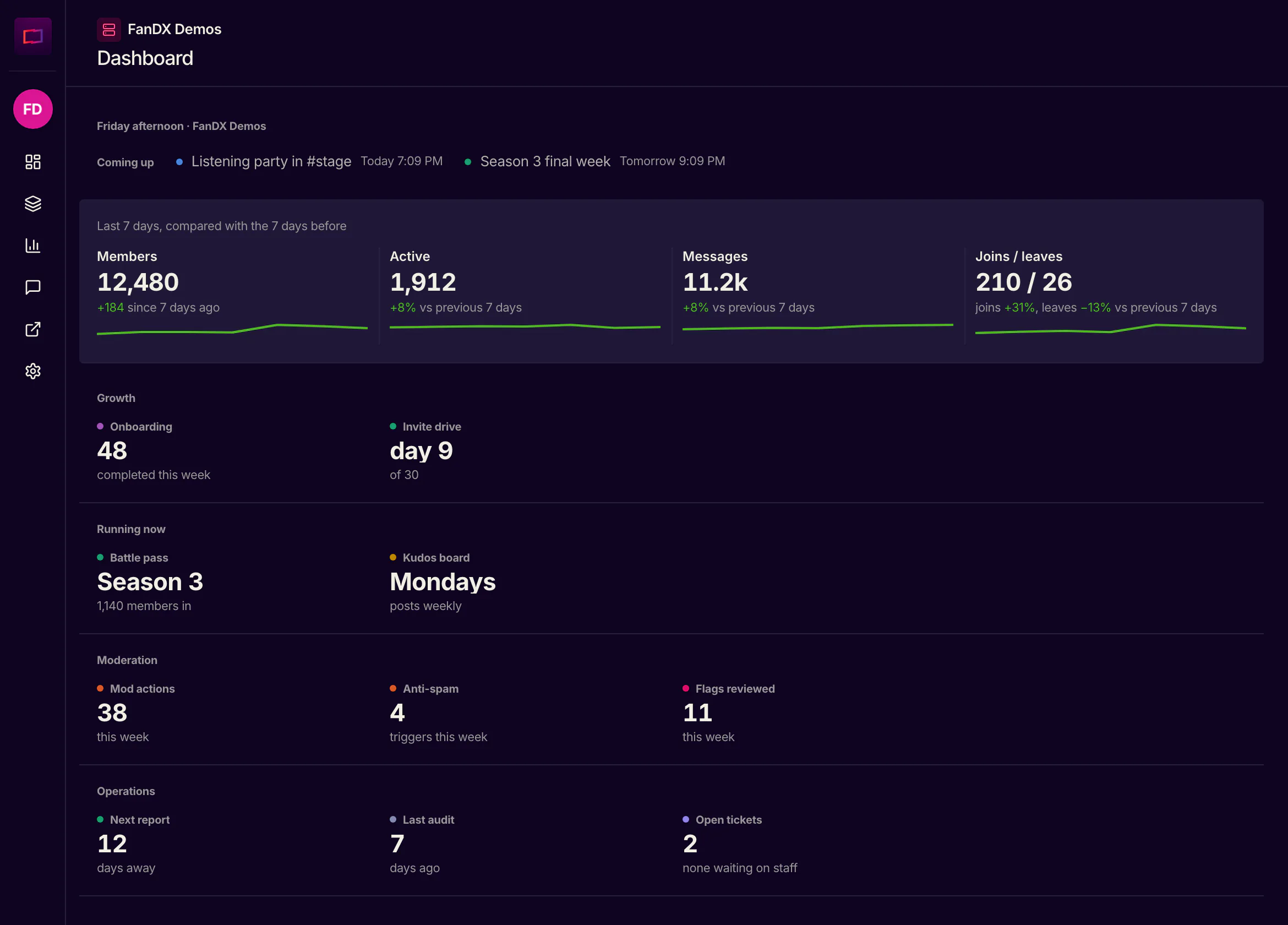
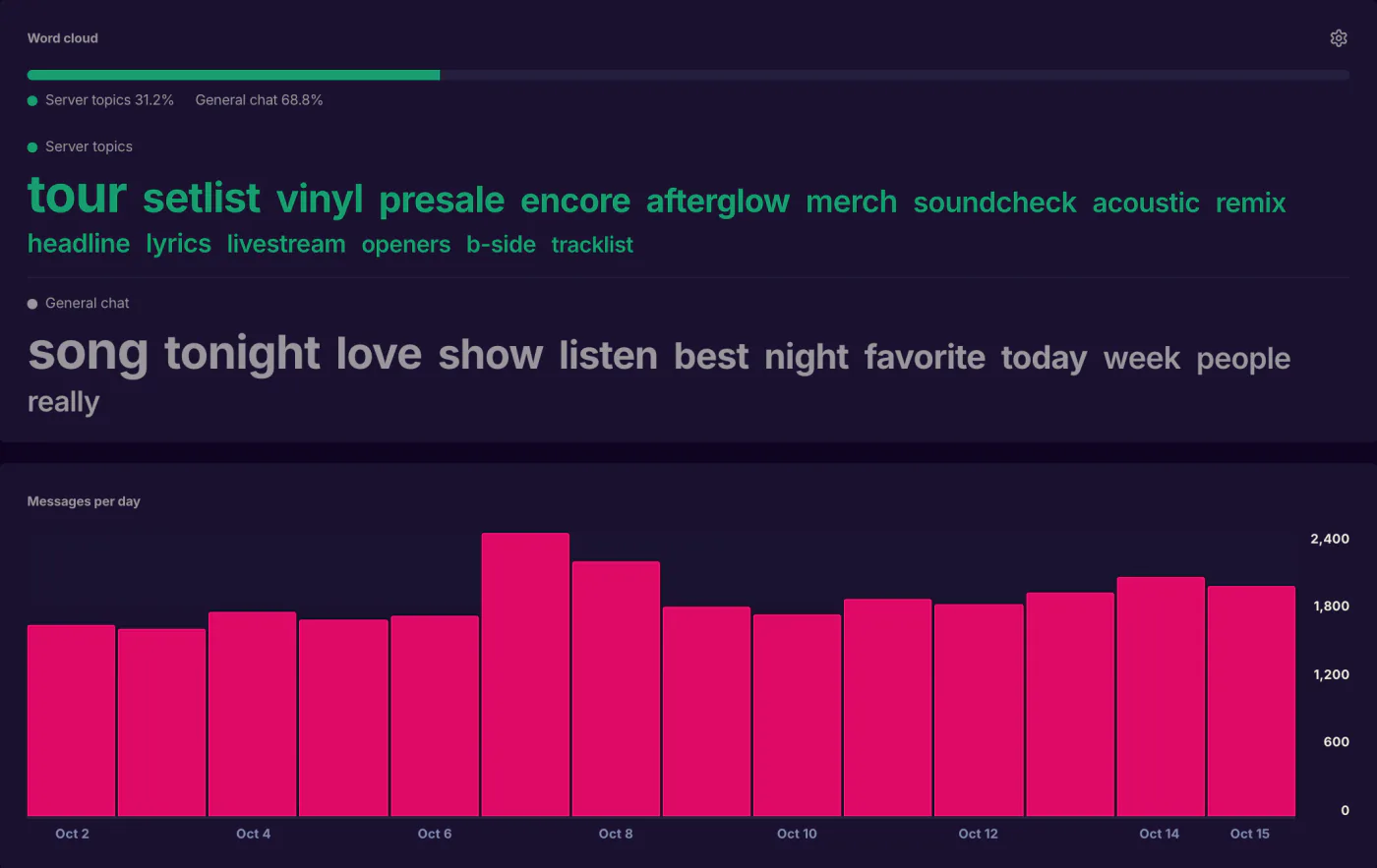
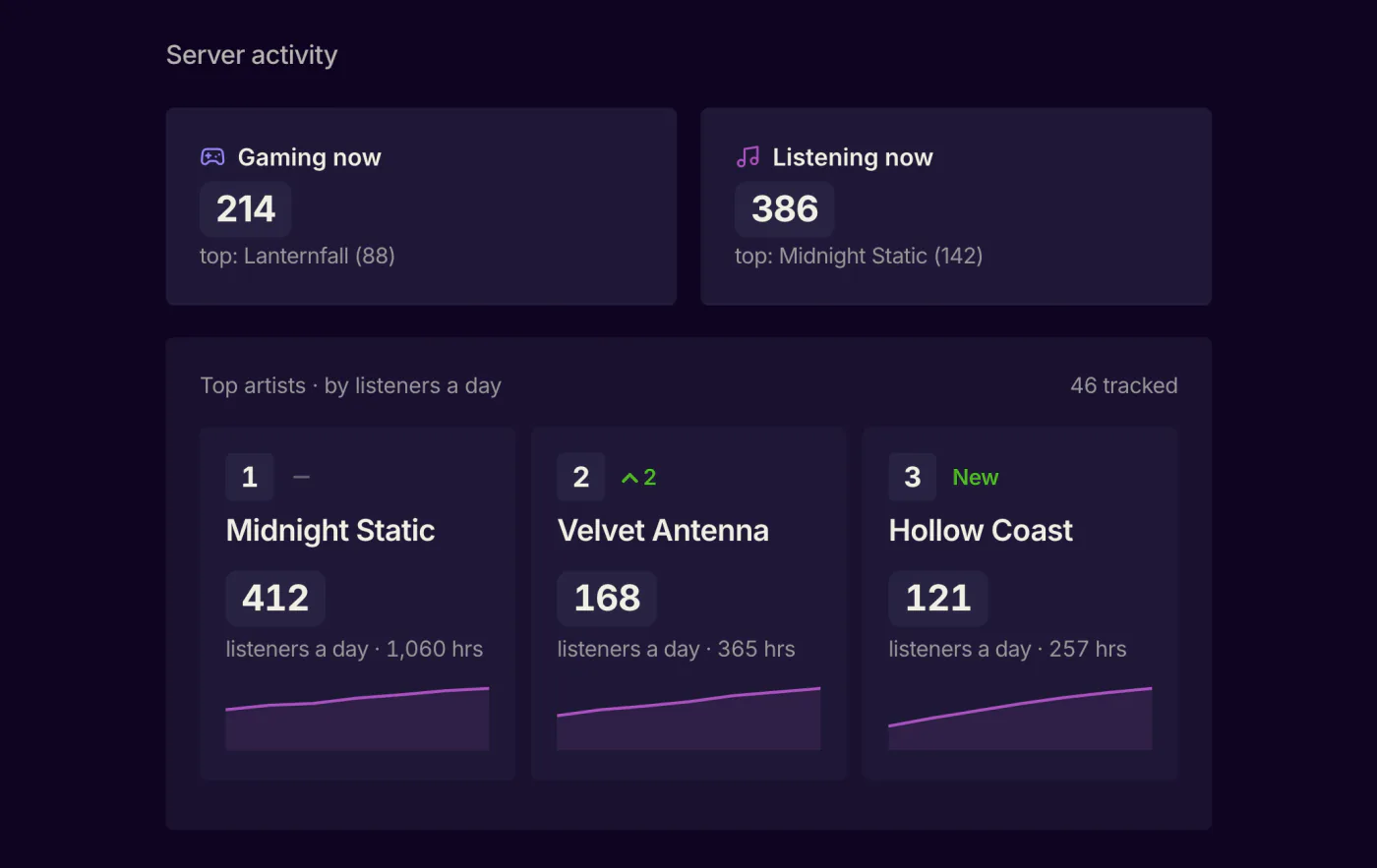
Home, the week at a glanceAnalytics, what members talk aboutAnalytics, what members play and hear
Shown on a demo server with sample data.
Your own fan account
Your community never sees someone else's bot. The app carries your name, avatar and artwork, and for a full white label we build a dedicated Discord app and run it for you. Nothing to set up or maintain.
Built and run for you
Your name and artwork
Compose and schedule posts
Rich analytics
Four dashboards instead of a member count. Hourly health scoring catches a raid as it happens. A word cloud weighted to your server shows what people actually talk about, and every announcement is marked so you can see how it landed.
Pulse, 24-hour health
Growth and retention
Engagement heatmaps
Live presence
Support tickets
A real support desk inside Discord. Members open a private thread from a panel you design, staff work it with a live status embed, and every conversation stays searchable.
Private-thread tickets
Categories and routing
Resolved rate, 7 days
Level system
The retention engine. Eighteen XP sources, from chat and voice to events and challenges, feed a fifty-tier ladder from Bronze I to Diamond X, with timed passes on top and role rewards granted the moment a tier unlocks.
18 XP sources
50-tier evergreen pass
Targeted multipliers
Server management
Run the server from the browser and never open Discord's settings. Live contrast checking against Discord's real background keeps your role colours readable.
Channels, roles, members
Discord's own AutoMod
Emoji, stickers, events
Reporting
A written monthly report, generated for you. Growth and join sources, retention against the month's cohort, and how many new members sent a message, left a reaction or joined voice.
Month-over-month deltas
Day 1 and week 1 activation
Join source attribution
Moderation
Automod with five scanners, your own custom rules and a strike ladder you set, so a first offence and a fourth are not treated alike. Spam-wave protection stops a hacked account posting the same message everywhere, and the Mod Board keeps one record per member.
Automod rules and strikes
Spam-wave protection
Mod Board and member reports
Restricted Channels
Mod applications, scored
Games and activities
Something to do on a quiet Tuesday. AI writes the trivia rounds, so there is no question bank to maintain, and peer kudos give members a way to thank each other that feeds into XP.
AI-generated trivia
Member kudos
Custom commands and sticky posts
Onboarding funnel
The moment someone joins becomes a funnel. New members answer your questions before they can see the community, and the answers sync to your CRM. Anonymous joins become contactable fans.
Gated entry, no DMs
Brevo, Klaviyo, Laylo, Sheets
Drop-off and answer breakdowns
Server audit
A one-click health check that reads like a consultant's report. Thirty-six rules across security, hygiene, configuration and accessibility, each with why it matters and what to fix.
36 rules, 4 categories
Shareable HTML report
Metadata only, never message text
Embed builder
A visual composer for the announcements a fan community lives on. Live preview renders real Discord markdown and your actual posting identity. What you see is what fans see.
Drag-and-drop blocks
Schedule, draft, template
Edit posts after they go live
Social alerts
The server fills up the moment you post or go live. YouTube and Twitch push to us directly instead of us polling, so there is no delay.
YouTube uploads and streams
Twitch go-live and offline
Per-account channel routing
Giveaways and contests
Giveaways with a prize, a number of winners and rules for who can enter, drawn fairly when time is up. Creative contests where fans enter through a form, your team approves each entry, and the community votes.
Entry rules by tenure, level, role
Fair draw, with redraws
Fan voting, winners posted
Forms
Build a form in the browser and post it with a button. Members answer in Discord's own form window, and each answer shows when they joined, their level and how active they are.
File uploads, 20 MB each
Filter, then export a spreadsheet
Give a role on submit
New
Smart Links
Every link button in a post becomes a tracked short link, so you can see the clicks each post earns. Save the links you share most, like Spotify or Steam, and repoint them even after posting.
Clicks and unique visitors
Saved links library
Sharing links and QR codes
New
VIP with Laylo
Turn members into fans you can reach. They sign up from a button in Discord and confirm by text or email, and only a confirmed opt-in turns their VIP role on. Opting out takes it off.
Your own Laylo account
Confirmed opt-in only
Role off on opt-out
Not shown: referral campaigns, Steam wishlist campaigns, reminders and message export.
Light / New tier
Platform access, with a strategist in the loop.
For teams running their own community who would rather not run it blind.
Full access to the dashboard. Every module, every analytics surface, no seat limits.
One monthly strategy sync. A working session with a strategist to read the numbers and set the next month.
A monthly written report. Our read on what changed and what to do about it.
Commerce / Shopify
The Shopify toolset
Loyalty and rewards that pay out where your fans already are.
Connect your Shopify store to your Discord once. After that it runs itself.
How the loop closes
01
The fan links their accountOne button on your storefront. They approve Discord's identify scope, which is their user ID and nothing else.
02
Roles are granted automaticallySpend, order count, largest order, server boosting, or time in the community. You pick the threshold.
03
Standing writes back to ShopifyTheir roles land on the customer record as tags and metafields, ready to build a segment on.
Data only moves in the safe direction. Discord receives role assignments and
nothing else. No product, order or customer information ever appears in your server.
Account linking
Ties a fan's Discord identity to their customer record, permanently. A three-year customer is never treated as new.
Role milestones
Set a threshold once and the role is granted forever after. Five triggers: lifetime spend, order count, largest order, server boosting, and days in the community. Rewards for showing up, not only spending.
Role-based discounts
You build the discount in Shopify's own editor, so you keep native stacking, collection scoping and usage limits instead of a worse copy of them.
Merchant analytics
What the integration is earning you. Revenue from linked members net of refunds, lifetime value, average order, and a link rate per role so you can see which push converted.
Lifecycle segments
Four self-maintaining segments to build email flows on: first purchase, lapsed at ninety days, anniversary, and at-risk. At-risk is someone who earned a reward and then stopped. A warm lead, not a cold one.
Rewards that self-correct
A tier earned by an order that was returned is not earned. The role comes off on its own. Roles you assigned by hand are never touched.
Free 14-day trial. Cancel any time from your Shopify admin.
Getting started
Two products. Start with the one you need.
We are onboarding a limited number of communities before general release, so each one
gets set up properly rather than handed a login and left to it.
Most teams start here
The app and dashboard
For a team running a Discord without a clear read on it. Analytics, onboarding,
tickets, levels, moderation and full server management, configured in the browser.
Shopify rewards
For a brand with a store and a community. Spend and participation earn Discord roles
automatically, and that standing flows back onto the Shopify customer record.
Tell us about your server and we will tell you which one fits.